Features Map My Maintenance | Every Tool You Need, In Every Plan
12 features. One subscription. Every plan.

The tools that make every job easier to manage

Every feature you need to run maintenance, projects, and procurement, included in every subscription, built around your asset plan, and ready to use the moment you sign up.

Card required. No charge until day 15. Cancel anytime before then.

Map My Maintenance brings work orders, projects, procurement and team coordination into one workspace, pinned to a real-world plan

Choose the feature you want to explore

Built for
  • Yachting
  • Shipyards & refit
  • Construction
  • Facilities & factories
  • Home & property
01Interactive plan

Find any job in seconds, by looking at the place it lives

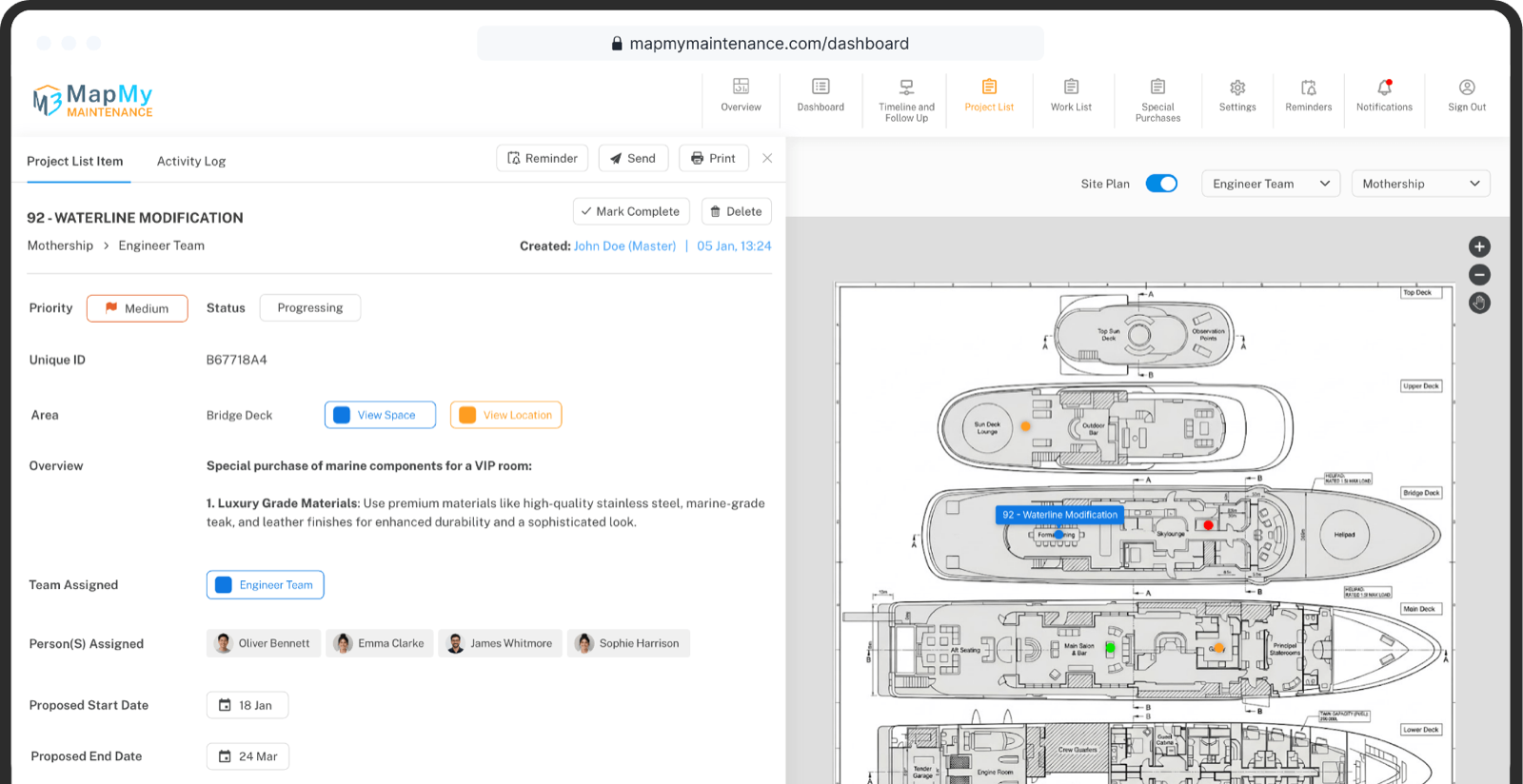
Upload your real-world plan — a yacht GA, a building floor plan, a factory layout, a sketch of your home. Define your floors, decks, or levels. Draw the spaces within them. Every job and every part now lives as a pin in the exact place it belongs.

Open the plan, look at the area, see what's open. The list and the map are the same thing.

  • Upload any GA, floor plan, or sketch
  • Define floors, decks, and levels
  • Draw spaces and rooms within them
  • Pin every job and part in place
  • Filter pins by status, priority, or team
  • The list and the map stay in sync
Project list item linked to a yacht site plan, with the work area pinned across decks.
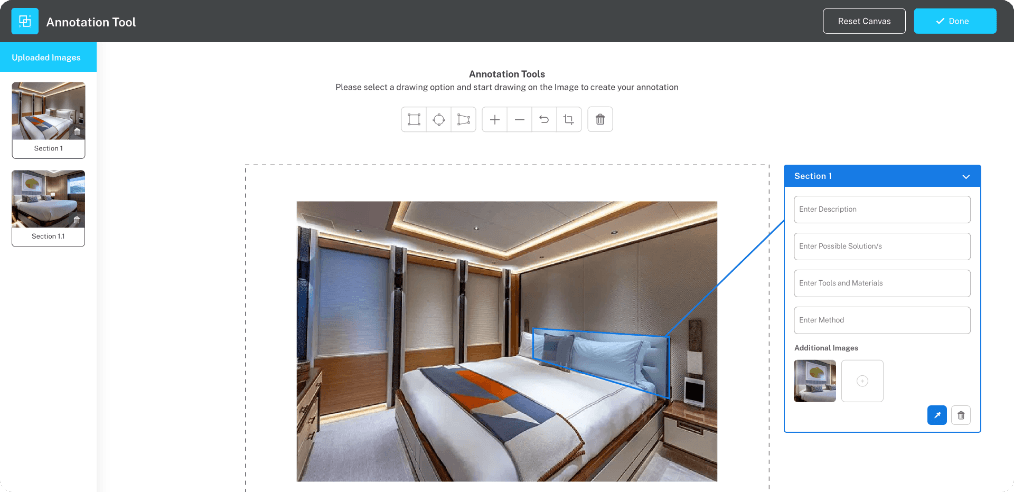
Annotation tool: a cabin photo with numbered section markers and a description panel.
02Annotation

Turn one photo into a complete work instruction

Snap a photo. Draw on it directly in the app. Mark the corrosion, the crack, the part that needs replacing. Add the diagnosis, the possible solutions, the tools and materials needed, and the method to fix it.

Need to document several problems on the same image? Create numbered sections — 1, 1.1, 1.2 — each with its own notes, materials, and method. Send the result to a contractor, hand it to a crew member, or file it with the handover report.
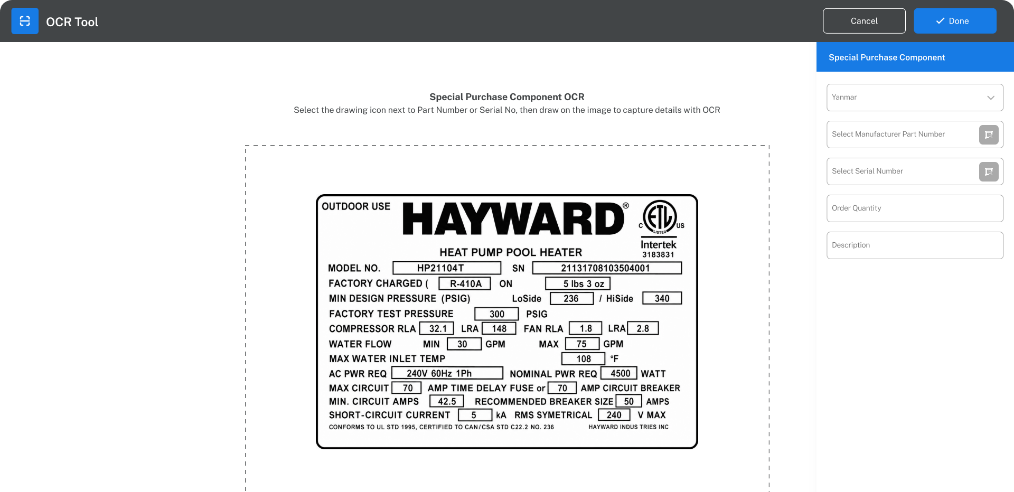
OCR tool reading an SKF bearing dataplate and dropping the part and serial numbers straight into the Special Purchase form.
03OCR

Skip the typos that cost you weeks

Take a photo of the part's dataplate, label, or packaging. Draw a box around the manufacturer part number. Draw another around the serial number. The OCR tool reads them straight off the image and drops them into the purchase record.

No typing. No squinting at faded labels. No wrong-part deliveries because someone misread a 6 as an 8.

04 OVERVIEW DASHBOARD

See your whole operation in one glance

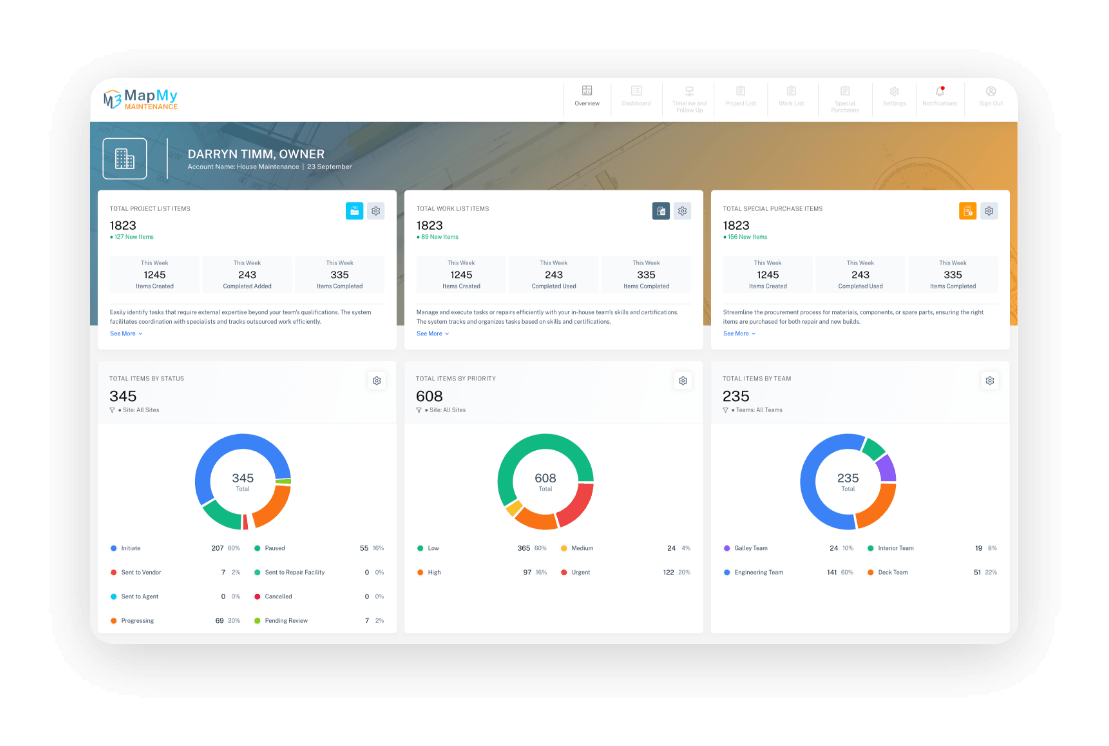
Three live counters across the top: open Work List items, open Project List items, and open Special Purchases. Each one carries a badge showing what's new since you last looked.

Underneath, three weekly metrics: items created, comments added, items completed. Below that, your work broken down by status, by priority, and by team — each chart filterable by site or team.

Most days, the dashboard is the only screen you need to open.

Map My Maintenance dashboard with totals and status, priority and team breakdowns.
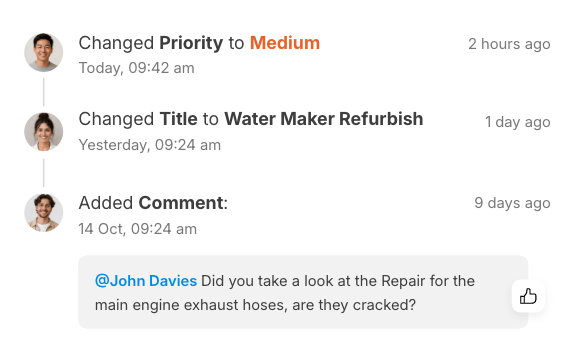
Activity log timeline showing priority and title changes plus an @mention comment.
05Activity log

Never lose track of who decided what

Every Work List item, Project List item, and Special Purchase carries its own Activity Log — a timestamped record of everything that's happened since it was created. Status changes, priority changes, date changes, photos and videos added, comments posted: it all writes itself into the log.

Tag team members with @everyone or mention a specific person so the right people are brought into the conversation.

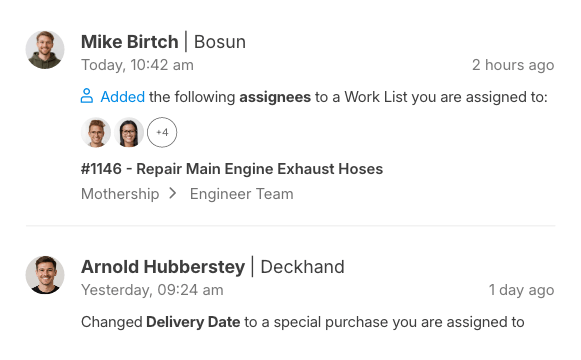
Notification feed of assignees added, delivery date changes and work-list activity.
06Notifications & reminders

Get notified when it matters. Not when it doesn't

Notifications only fire when something meaningful changes. The person making the change never gets pinged about their own change. The system respects your attention.

Filter by Unread, I Was Mentioned, Assigned To Me, or Timeline & Follow-Up. Set date-based reminders. Configure email digests per site — every 12 hours, daily, weekly, or off entirely.

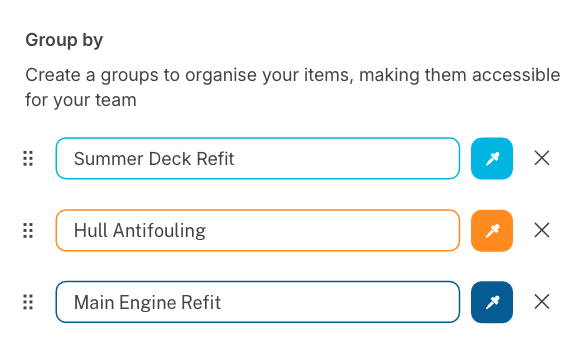
Group by panel with Deck Refit 2026, Hull Antifouling 2026 and Main Engine Refit 2026 groups.
07Grouping & filtering

Organise large lists into clear, manageable views

Create custom Group Tags to organise items the way you actually think about them — Spring Refit, Engine Room Phase 1, Owner's Snag List — whatever fits the job.

Filter by status, priority, person, location, manufacturer, or date range, alone or in combination. Show or hide table columns. Your settings are saved for next time.

08Timeline & Follow-Up

The Gantt chart that ties your whole operation together

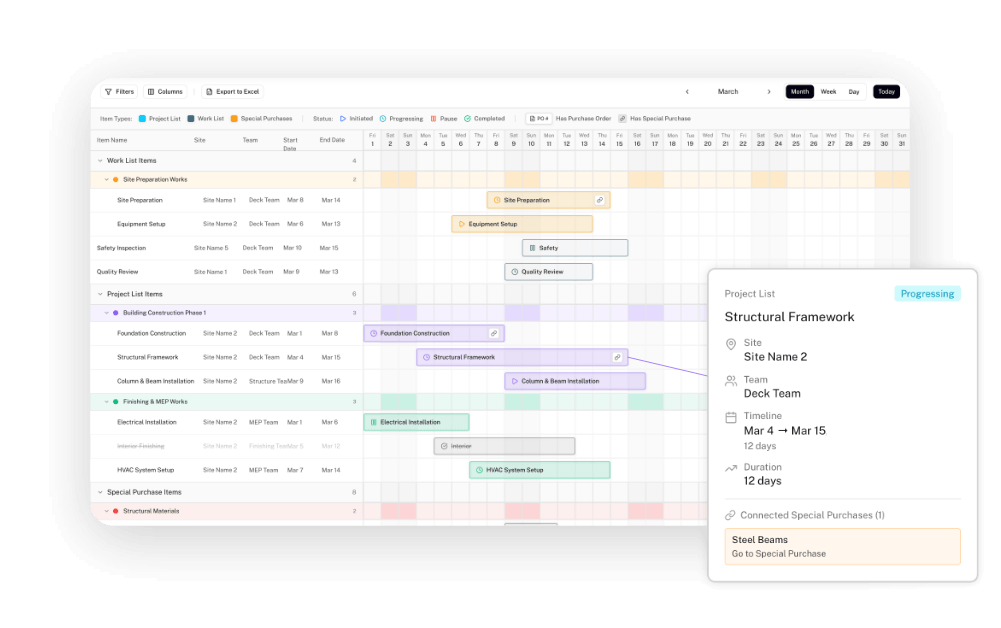
Every job, project, and part on order shows up as a bar on a Gantt chart, laid out across the dates the work is planned to happen. It's your full project tracker, in one holistic view.

Switch between Month, Week, and Day views. Group items by team, by project, or by stage. Each bar is colour-coded by status. Bars with a linked part order get a chain-link icon, so you can see at a glance which jobs are waiting on procurement.

Gantt timeline showing Work List, Project List and Special Purchase items as colour-coded bars.
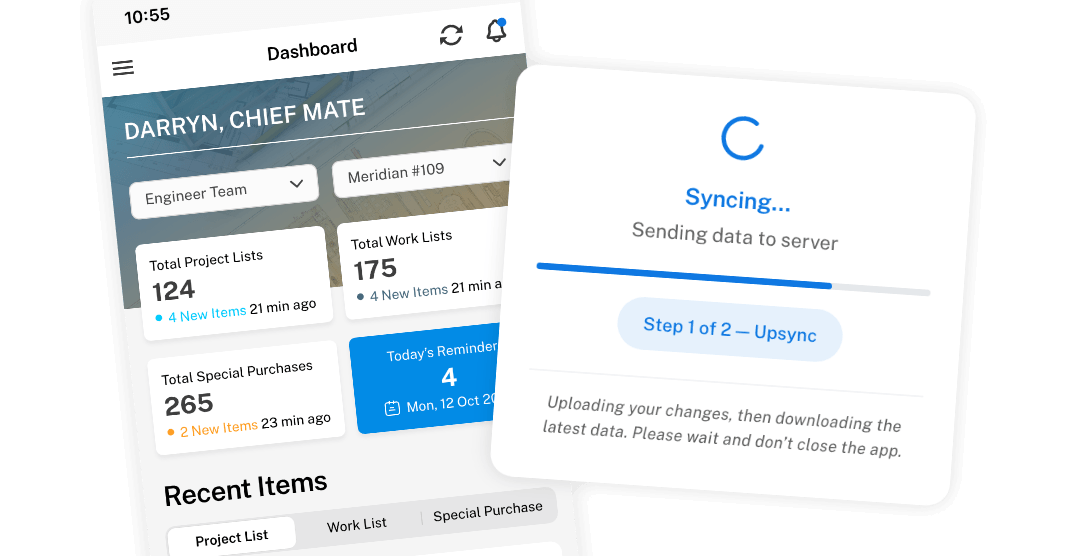
Map My Maintenance mobile dashboard with a Syncing overlay.
09Mobile, offline & sync

Keep working when the signal cuts out

Map My Maintenance works on iPhone, iPad, and Android. Same data, same map, same conversations — whichever device you're holding. Drop pins, add photos, write notes, and leave comments even with no connection.

When you're back online, sync uploads your changes and pulls down everyone else's. You see exactly when the last sync happened and, if something fails, what went wrong and how to retry.

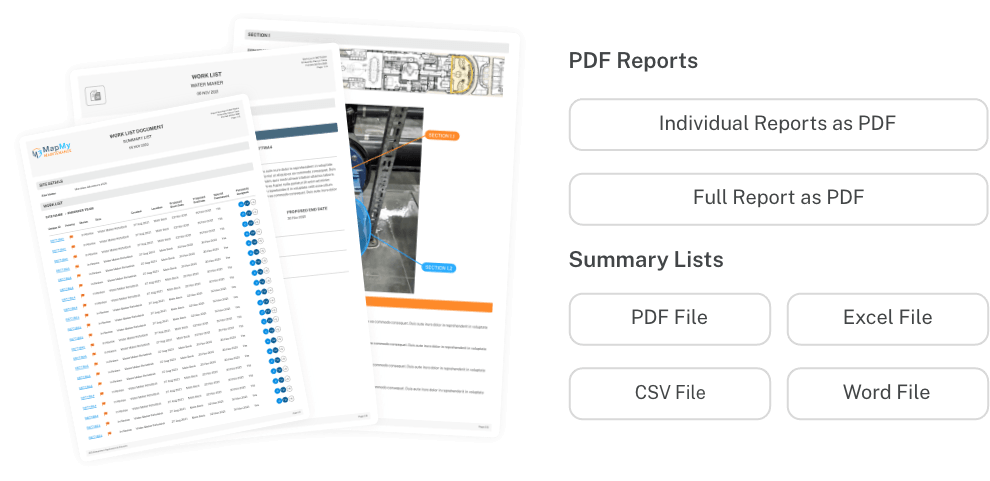
Branded MapMy report pages with Work List documents and export options.
10Reporting & export

Turn your work into a report worth showing

Every list in Map My Maintenance can be turned into a clean, branded report. Choose Individual Reports, a Full Report covering everything, or Summary Lists. Pick the format — PDF, Excel, CSV, or Word. Send it straight from the app, or download it.

Printed reports include photos, annotations, area and location on the plan, the team members assigned, linked parts, group tags, and Special Purchase references.

11Multi-site

Manage every site without jumping between systems

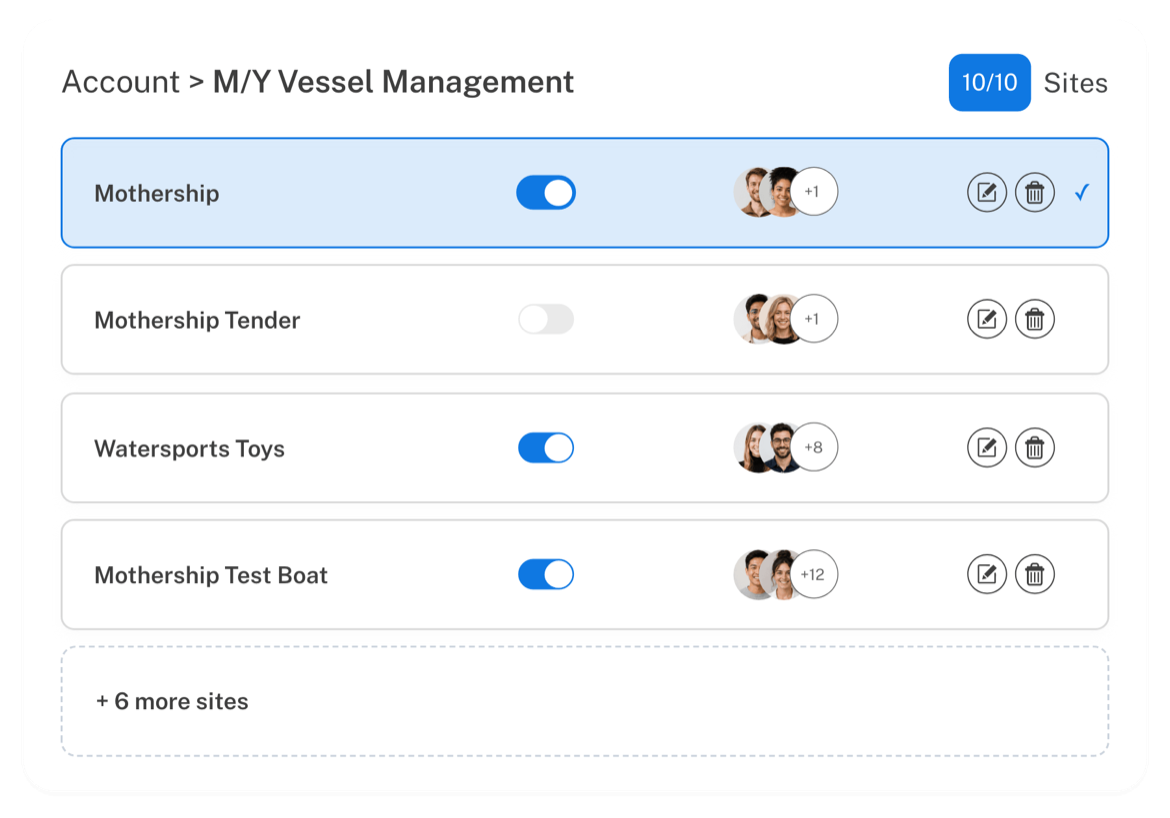
Whether you are responsible for one site or several, Map My Maintenance keeps each site organised inside one workspace. Each site can have its own plan, team, tasks, notifications, and records, while still staying connected under one account.

Choose the plan that matches the size of your operation and scale as your site list grows.

  • Sites by plan
  • Scale as needed
  • Multi-site ready
M/Y Vessel Management account showing ten sites in a switcher.
12Permissions

Give people the exact access they need

Three user roles define what each person can see and do. Sites are the workspaces that anchor all of it to real locations within your operation.

Admin

Runs the account. Sets up sites, invites team members, manages billing, and has full control.

  • Runs the account
  • Sets up sites
  • Invites team members
  • Manages billing
  • Has full control

Normal User

Does the work. Creates and updates Work Lists, Project Lists, and Special Purchases, assigns jobs, and comments across the sites they have access to.

  • Does the work
  • Creates and updates Work Lists
  • Creates and updates Project Lists
  • Creates and updates Special Purchases
  • Assigns jobs
  • Adds comments
  • Creates reports

Guest

Limited, controlled access for contractors, suppliers, or owners. View, comment, and (where Admins allow it) update specific items.

  • Limited, controlled access for contractors, suppliers, or owners
  • Can view items
  • Can comment on items
  • Can update specific items (where Admins allow it)

Site

The workspace. A mapped layout of your asset, yacht, building, or facility, that anchors Work Lists, Projects, and Maintenance to real locations within your operation.

  • A Site is a General Arrangement (GA) Plan or mapped operational area within the system
  • Can represent a yacht, house, factory, commercial shopping centre, office park, hotel, marina, or other managed asset
  • Used as the visual and structural foundation for Work Lists, Projects, Maintenance, Deficiencies, and Operational Reporting
  • Allows users to map locations, systems, equipment, and operational zones directly onto the plan/layout of the asset
Capability Admin Normal Guest
View Work, Project & Purchase lists
Create new items
Edit existing items
Delete items
Add photos, files & comments
Mention @everyone
Annotate photos & create work instructions
Use OCR for part numbers
Generate reports & exports
View the Dashboard
View the Activity Log
Manage users
Set up sites & plans
Manage notification rules
Manage billing
Configure per-Guest visibility per site

Yes Limited No

Admins can fine-tune what each Guest sees on a per-site basis, useful when a contractor is brought in for one project and shouldn't see the rest of the operation.

That's the system. Try it for yourself.

Fourteen days. Every feature on this page. One click to cancel if it's not for you.

Card required. No charge until day 15. Cancel anytime before then — we'll even remind you.